愛招飛紡織印染ERP操作手冊 愛招飛紡織印染ERP操作手冊
  • FastERP-1 (opens new window)
  • Smart (opens new window)
  • PinToo (opens new window)
  • FastWeb (opens new window)
  • FastERP-2 企業管理系統 (opens new window)
  • 印染業ERP
  • 工廠終端機
  • TARS (opens new window)
  • MARS (opens new window)
  • TaskRunner (opens new window)
  • Flying (opens new window)
  • FastDesk (opens new window)
  • HiDesk (opens new window)
  • HiNAT (opens new window)
  • FastBPM (opens new window)
  • 設備故障診斷 (opens new window)
  • 設備最佳運轉效益 (opens new window)
  • 企業智能助手SmeGPT (opens new window)
  • 燈號管理 (opens new window)
  • 戰情室 (opens new window)
  • 能源管理 (opens new window)
  • 人車定位 (opens new window)
  • 戰情指揮系統 (opens new window)
  • FastERP-1 (opens new window)
  • FastWeb (opens new window)
  • Smart (opens new window)
  • PinToo (opens new window)
  • Flying (opens new window)
  • TARS (opens new window)
  • 通用功能

    • Report (opens new window)
    • Script (opens new window)
    • Echarts (opens new window)
    • Chart (opens new window)
    • DB Install (opens new window)
  • FastERP-1 (opens new window)
  • Smart (opens new window)
  • PinToo (opens new window)
  • FastWeb (opens new window)
  • FastERP-2 企業管理系統 (opens new window)
  • 印染業ERP
  • 工廠終端機
  • TARS (opens new window)
  • MARS (opens new window)
  • TaskRunner (opens new window)
  • Flying (opens new window)
  • FastDesk (opens new window)
  • HiDesk (opens new window)
  • HiNAT (opens new window)
  • FastBPM (opens new window)
  • 設備故障診斷 (opens new window)
  • 設備最佳運轉效益 (opens new window)
  • 企業智能助手SmeGPT (opens new window)
  • 燈號管理 (opens new window)
  • 戰情室 (opens new window)
  • 能源管理 (opens new window)
  • 人車定位 (opens new window)
  • 戰情指揮系統 (opens new window)
  • FastERP-1 (opens new window)
  • FastWeb (opens new window)
  • Smart (opens new window)
  • PinToo (opens new window)
  • Flying (opens new window)
  • TARS (opens new window)
  • 通用功能

    • Report (opens new window)
    • Script (opens new window)
    • Echarts (opens new window)
    • Chart (opens new window)
    • DB Install (opens new window)
  • 紡織印染業ERP幫助手冊
  • 自助匯入實施

  • 快速上手

  • 帳務管理(ACT)

  • 基礎資料(BAS)

  • 織造管理(TEX)

  • 文件管理(DOC)

  • 生產管理(MOC)

  • 物料管理(MRP)

  • 銷售管理(ORD)

  • 委外管理(PUB)

  • 採購管理(PUR)

  • 品質管理(QCM)

    • 品質管理目錄
    • 檢測專案分類
    • 檢驗專案資料
      • 操作步驟
      • 部分欄位說明
    • 坯布疵點資料
    • 基礎工藝單
    • 定型工藝單
    • 生產工藝單
    • 異常回修報告單
    • 染整不合格報告
    • 織造不合格報告
    • 定前檢測
    • 定后檢測
    • 檢測評定
    • 坯布檢驗單
    • 成品檢驗單
    • 品質報表

  • 樣布管理(SAM)

  • 系統管理(SYS)

  • 工藝管理(TEC)

  • 人事行政(HRM)

  • 風險管控(RIS)

  • 掌上通(APP)

  • 終端機(TEM)

目录

檢驗專案資料

# 品質管理-檢驗專案資料

  • 文件號: E-ON-QCM-2502

  • 目的: 對檢驗專案的資料的基本定義。

  • 功能:

    1. 檢驗專案資料的新增、編輯、刪除等操作。
  • 範圍:

    1. 檢驗專案資料的建立。
  • 後置模組: 檢驗專案資料。

  • 執行部門: 工藝技術部。

  • 責權: 工藝員-新增、修改檢驗專案,審覈建立的檢驗專案是否正確。

  • 依據: 依據標準的有共性的工藝資訊建立檢驗專案,方便後續查詢。

  • 控制重點: 檢驗專案的資訊是否正確。


# 操作步驟

  1. 進入檢驗專案資料界面

      進入系統后,點選[品質管理]-[檢驗專案資料]進入對應界面。在目前界面,可根據快捷查詢條件對檢驗專案資料資訊進行查詢。
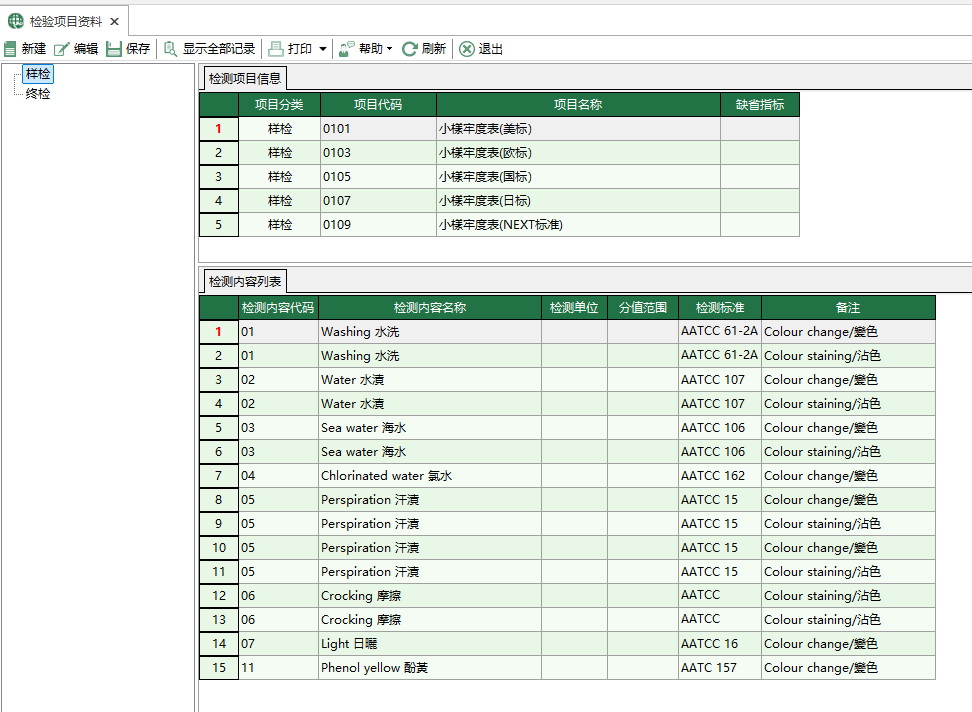
    圖1 檢驗專案資料
    圖1 檢驗專案資料
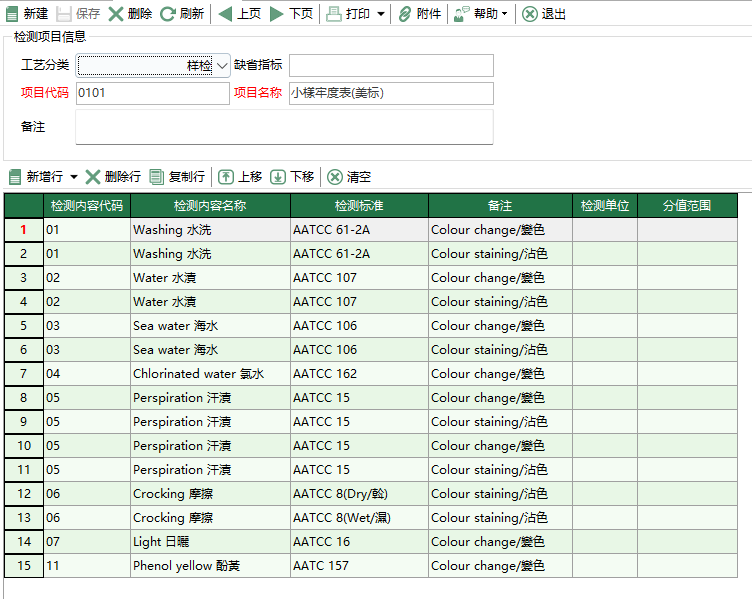
  2. 編輯、新增檢驗專案資料

      點選欄位中的[新建]按鈕,打開[檢驗專案資料]界面,詳細填寫欄位中的各項記錄。

    圖2 檢驗專案編輯
    圖2 檢驗專案編輯

      填寫完畢並確認無誤後點擊[儲存]按鈕,如不想儲存,點選[退出]按鈕。


# 部分欄位說明

[專案程式碼]: 檢驗專案的編號。

[專案名稱]: 檢驗專案的名稱。

[檢測內容程式碼]: 檢測內容的編號。

[檢測內容名稱]: 檢測內容的名稱。

[檢測標準]: 檢測內容參照的檢測標準。

[備註]: 檢測內容的參照備註。

檢測專案分類
坯布疵點資料

← 檢測專案分類 坯布疵點資料→

Copyright © 2021-2025 愛招飛IsoFace | ALL Rights Reserved
  • 跟随系统
  • 浅色模式
  • 深色模式
  • 阅读模式